• Touhou 6 New Classic Score Attack Ongoing!

    Read the submission rules, prizes and everything inbetween here:

    Good luck!

    Also check out the community art event here! Everyone is welcome!

Touhou Troubleshooting (Mainline+Spinoff)

View attachment 14559
I'm really not good with tech, but I tried installing Touhou 7, and this came up when I tried installing the game? I've gone through installing d3d8to9 as well as directX but neither work.
Japanese locale might fix it? I remember seeing this error before, though I don't remember how I fixed it, but most likely through setting Japanese locale. If it fixes it, I'll be able to use this information to refine my guide.
 
14.5 and 15.5 I click on it, and it opens then close like a crash but nothing shows or indicates a crash happened, does anyone have a idea on the problem? These two when the crash happens also causes my pc to turn off and back on.
 
Last edited:
Hey so this is pretty much my first post on the site here I recently have been having problems with touhou 12 crashing on startup everytime I try to play the game on fullscreen even tho theres nothing i'm doing wrong when setting the game up after downloading. I have went into the Thcrap logs and did discover what error i'm having it says: The instruction at 0x0043164E referenced memory at 0x00000120. The memory could not be read. I have tried many solutions from typing on to google to find a fix but i'm at my wits end with everything I tried simply not work at all, I know that I can just play the game on windowed but have played these games on fullscreen previously with no problem so if you have a solution to the problem that can work i'm all ears.
If this helps i'm on windows 11. All I ask is that I hope to hear your answer asap and thanks for looking at my post here.
 
Captura de pantalla 2026-09-04 235457.webp
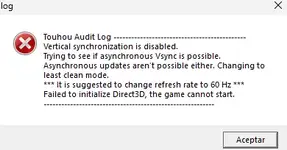
Hello, Moriya Shrine, i have downloaded Touhou 8 and Touhou 10 recently, while tha latter worked well, i've been getting this error while trying to execute the Touhou 8 .exe file (the thcrap one) and i honestly have no idea how to fix it, it mentions Vsync and something else, i can't quite make sense of it, i am not very good with these kinds of things, does anyone know what i have to do? Sorry for the post in case is something stupidly easy to fix.
 
Hey so this is pretty much my first post on the site here I recently have been having problems with touhou 12 crashing on startup everytime I try to play the game on fullscreen even tho theres nothing i'm doing wrong when setting the game up after downloading. I have went into the Thcrap logs and did discover what error i'm having it says: The instruction at 0x0043164E referenced memory at 0x00000120. The memory could not be read. I have tried many solutions from typing on to google to find a fix but i'm at my wits end with everything I tried simply not work at all, I know that I can just play the game on windowed but have played these games on fullscreen previously with no problem so if you have a solution to the problem that can work i'm all ears.
If this helps i'm on windows 11. All I ask is that I hope to hear your answer asap and thanks for looking at my post here.
You could try applying DXVK, or reinstalling DirectX, I'm thinking that might fix it, as I've seen fullscreen related issues fixed by that. Otherwise, you could do a workaround (perhaps fix?) where you install vpatch (there's a "Download" button at the top of the column that'll give you a .zip here. IIRC, you'll need to add a vpatch.ini, vpatch_th12_unicode.dll, and vpatch.exe from the same revision folder, into your th12 folder.) You should check if just vpatch by itself fixes it by running vpatch.exe after you set the folder up. To make it work with thcrap, I think you'd need to go to the thcrap config folder, and in games.js, replace the first .exe's name with vpatch.exe. If vpatch by itself won't fix the fullscreen issue, then in vpatch.ini, put AskWindowMode to 1, Width and Height to your monitor's resolution, and AlwaysOnTop to 1 (to prevent your taskbar from being in the way), and you could play in windowed mode that mimics fullscreen, though I think that might stretch out your game a bit (assuming you have a 16:9 monitor), unless you try and keep the aspect ratio the same, but then the window likely wouldn't look fullscreen (as in, there wouldn't be the characteristic black area to the left and right of your screen, instead it'd be whatever is on your desktop. I wonder whether Magpie or something "could" fix that, as in introduce it. But if not, you could go to your Windows wallpaper, and perhaps just make it black, and game while at there lol)
 
Hello, Moriya Shrine, i have downloaded Touhou 8 and Touhou 10 recently, while tha latter worked well, i've been getting this error while trying to execute the Touhou 8 .exe file (the thcrap one) and i honestly have no idea how to fix it, it mentions Vsync and something else, i can't quite make sense of it, i am not very good with these kinds of things, does anyone know what i have to do? Sorry for the post in case is something stupidly easy to fix.
I think Japanese locale might fix it. You could try using either Locale Emulator, or putting your system locale to Japanese.
 
You could try applying DXVK, or reinstalling DirectX, I'm thinking that might fix it, as I've seen fullscreen related issues fixed by that. Otherwise, you could do a workaround (perhaps fix?) where you install vpatch (there's a "Download" button at the top of the column that'll give you a .zip here. IIRC, you'll need to add a vpatch.ini, vpatch_th12_unicode.dll, and vpatch.exe from the same revision folder, into your th12 folder.) You should check if just vpatch by itself fixes it by running vpatch.exe after you set the folder up. To make it work with thcrap, I think you'd need to go to the thcrap config folder, and in games.js, replace the first .exe's name with vpatch.exe. If vpatch by itself won't fix the fullscreen issue, then in vpatch.ini, put AskWindowMode to 1, Width and Height to your monitor's resolution, and AlwaysOnTop to 1 (to prevent your taskbar from being in the way), and you could play in windowed mode that mimics fullscreen, though I think that might stretch out your game a bit (assuming you have a 16:9 monitor), unless you try and keep the aspect ratio the same, but then the window likely wouldn't look fullscreen (as in, there wouldn't be the characteristic black area to the left and right of your screen, instead it'd be whatever is on your desktop. I wonder whether Magpie or something "could" fix that, as in introduce it. But if not, you could go to your Windows wallpaper, and perhaps just make it black, and game while at there lol)
I have applied the DXVK and it works now! Thank you so much!
 
If the game doesn't start:

You could try restarting your PC, it's the easiest and sometimes fixes it, though not usually.

If you get an error and it's gibberish (and probably mentions DirectSound or DirectInput), you might need to emulate Japanese locale for the game or set your system locale as Japanese (might need PC restart). I've never used it myself, but Locale Emulator exists that I've heard others use.

If the error mentions Direct3D, a missing d3dx dll file, or error 0xc000007b, it's a DirectX error. Either you should reinstall the DirectX runtime, or more preferably for the game, use d3d8to9 or DXVK, which should come with some improvements besides fixing the error, like better input delay. To use it, you would want to put the d3d8.dll (or d3d9.dll if playing th10 or above and using DXVK) into the game's folder. For DXVK, the dll from the x32 folder if the game is 32bit, and x64 if it's 64bit. For 6-9.5 with DXVK, you'd want to include both its d3d8.dll and d3d9.dll
d3d8to9 is only for Touhou 6-9.5. If your device doesn't support the latest Vulkan, you can also use an older version of DXVK, like 1.10.3, 2.6.2, etc. DirectX 8 support was first added in DXVK version 2.4. DirectX 9 Touhou games are far less likely to have issues than DirectX 8.
These can also fix fullscreen related issues.

If you get an error that mentions "T&L HAL",
it's one I don't have complete information on, but you could try putting the game to windowed mode through the vpatch.ini config or custom.exe. You could edit vpatch.ini to customize the size of the window. And if you have a screen that isn't 16:9, you could also try putting your screen to a 16:9 resolution in your display settings.

Another common solution to some problems seems to be re-extracting the game from the .zip

If the game still doesn't start after everything, you could look around in this thread, and in Windows Event Viewer to troubleshoot. The two most common issues are DirectX and Japanese locale. If you're on another OS, I'd be happy to try to help.

If the game runs:

With too much FPS (or maybe too low?), or with messy textures, d3d8to9 or DXVK should fix it.

If you want to change the controls on keyboard, there's this thcrap mod. Alternatively, you could also use key rebinding scripts. You can do that with AutoHotkey, or other programming language scripts.
I'm having this problem even after restarting my PC, and I don't know what to do
 

Attachments

  • Captura de tela 2026-09-09 231747.webp
    Captura de tela 2026-09-09 231747.webp
    220.2 KB · Views: 0
I'm having this problem even after restarting my PC, and I don't know what to do
I don't know why thcrap doesn't wanna work, but you could try re-extracting the game from the zip and seeing if that works. Alternatively, perhaps you could try to reinstall thcrap for the game, if you could figure that out (IIRC just gotta replace the thcrap folder with the new one, remove the current thcrap shortcuts, so like th08 (thpatch-en).exe and its custom version, then run thcrap.exe and make a new patch that you'll launch from somewhere). Another alternative would be to try playing without thcrap, by just starting from vpatch.exe instead, but that means you won't have translations, but if you decide to try reinstalling thcrap, I would recommend first trying that just to verify the normal game works.
 
I don't know why thcrap doesn't wanna work, but you could try re-extracting the game from the zip and seeing if that works. Alternatively, perhaps you could try to reinstall thcrap for the game, if you could figure that out (IIRC just gotta replace the thcrap folder with the new one, remove the current thcrap shortcuts, so like th08 (thpatch-en).exe and its custom version, then run thcrap.exe and make a new patch that you'll launch from somewhere). Another alternative would be to try playing without thcrap, by just starting from vpatch.exe instead, but that means you won't have translations, but if you decide to try reinstalling thcrap, I would recommend first trying that just to verify the normal game works.
Thanks for telling! It was probably because I didn't have thcrap downloaded,but now I downloaded it and I'm able to play touhou 8!
 
Back
Top