• Touhou 6 New Classic Score Attack Ongoing!

    Read the submission rules, prizes and everything inbetween here:

    Good luck!

    Also check out the community art event here! Everyone is welcome!

Touhou Troubleshooting (Mainline+Spinoff)

So im trying to launch it and already gone deleting all the old vpatches replaced them and it still shows vpatch error so i tried to launch in a seperate folder with the vpatch n without the thcrap and it shows that it cannot find the exe file. I am not using and locale emulator i just changed the locale for my system which is win7 so do i have to go through the thcrap config and confirm that it is pointing to the exe file? This is my first time doing this and i dont think i can do anything javascript related so am i cooked or theres a roundabout way?
 
So im trying to launch it and already gone deleting all the old vpatches replaced them and it still shows vpatch error so i tried to launch in a seperate folder with the vpatch n without the thcrap and it shows that it cannot find the exe file. I am not using and locale emulator i just changed the locale for my system which is win7 so do i have to go through the thcrap config and confirm that it is pointing to the exe file? This is my first time doing this and i dont think i can do anything javascript related so am i cooked or theres a roundabout way?
Throwing out some ideas, if you wanna play the Japanese version. When replacing vpatch, you want to get all the files from the same vpatch folder, if you got the vpatch zip from touhouwiki. You also don't want to rename game executables. Also after changing your system locale, a PC restart might be needed.
You could try to re-unzip Touhou 6 in a new folder, and seeing if running vpatch.exe just like that will make the game work. If you wanna update vpatch, then you can try replacing the files and seeing if it will work with those as well or not. Another thing you could try is launching thcrap.exe and getting the Japanese language from there, and trying to launch the game with a shortcut for it.
Edit: By the way, obligatory Linux shilling. If you're not using Windows 7 in a VM or offline, and if you're not using Nvidia, I would recommend trying out Linux. Linux Mint is quite nice.
 
after I reinstalled windows (not updated) all my touhou games (6, 7, 7.5) in full-screen mode just show a black/dark gray screen. The music plays, the interface works, but the game itself doesn't display
 
Throwing out some ideas, if you wanna play the Japanese version. When replacing vpatch, you want to get all the files from the same vpatch folder, if you got the vpatch zip from touhouwiki. You also don't want to rename game executables. Also after changing your system locale, a PC restart might be needed.
You could try to re-unzip Touhou 6 in a new folder, and seeing if running vpatch.exe just like that will make the game work. If you wanna update vpatch, then you can try replacing the files and seeing if it will work with those as well or not. Another thing you could try is launching thcrap.exe and getting the Japanese language from there, and trying to launch the game with a shortcut for it.
Edit: By the way, obligatory Linux shilling. If you're not using Windows 7 in a VM or offline, and if you're not using Nvidia, I would recommend trying out Linux. Linux Mint is quite nice.
Yeah after deleting the whole file and extracting the zip file again when i cofigured the vpatch and thcrap again it now seems to work perfectly fine. I want try out Linux distros if i get a new pc with VM. I heard you you can't play well with linux if u don't know what your doing. Is linux mint more flexible in terms of compatiblity? Does Nvidia have a os i did not know that.
 
after I reinstalled windows (not updated) all my touhou games (6, 7, 7.5) in full-screen mode just show a black/dark gray screen. The music plays, the interface works, but the game itself doesn't display
Maybe try reinstalling the DirectX runtime. Or perhaps using d3d8to9 or DXVK.
 
I heard you you can't play well with linux if u don't know what your doing. Is linux mint more flexible in terms of compatiblity?
Linux Mint is really simple, and you can learn things as time passes, just look up what you want to learn and experiment, though be a bit careful not to break your system somehow. You can use backups with Timeshift and have a reinstall USB at the ready.
Whether Mint is "more flexible in terms of compatibility" is not exactly a yes or no answer. They make many things easy, like by having a driver manager, kernel manager, and some desktop environment theme manager I think? It's Linux at the end of the day, so you "could" do whatever you want if it's something different from what Mint offers, but if you want to do it in a way that will work real well or maybe even just working, you would need some know-how and willingness to go through some hassles. Here are some examples you can choose to read:

Mint's desktop environment is designed with GTK, so if you wanted to install a QT-based desktop environment like KDE Plasma, some of Mint's things would not look great.
And at the moment Mint has a very old Plasma package as well, since Mint's latest Ubuntu version is based on Ubuntu 24.04, which decided to wait for the next major Plasma version to mature more before including it in their Long-Term Support release, and now the next Ubuntu LTS is about 5.5 months away, but Mint will also take some time until they release their own rebase off of it. You could get around that somehow, like by compiling KDE and its dependencies yourself and setting it up SOMEHOW, but then you'd also have to maintain it, and you might leave room for error. Maybe you could also use a PPA, but that would also introduce room for error on the end of whoever is maintaining it.

Linux Mint makes many or most important things for the ordinary guy simple, so I think it's great for starting out if you don't want to use a QT-based DE like KDE (and I don't know what window managers would be like on Mint), and if you don't care about having new software. But it's not as flexible "easily" as Arch Linux or something, though Arch also isn't so beginner friendly.

Does Nvidia have a os i did not know that.
I think there was a misunderstanding. In a literal sense, I don't know if Nvidia has an OS or not. But what I meant to say was Nvidia doesn't work as well on Linux as AMD and Intel does. I heard their proprietary drivers have been getting better, but old GPUs are on the legacy branches which shouldn't get those improvements, which is pretty problematic. There are open source drivers for Nvidia too, but Nvidia hadn't done good work on that front, while AMD and Intel did. I'm not sure how things will be in the future with Intel and Nvidia, because Intel wanted to be more proprietary, and Nvidia has been helping out with open source drivers (though I don't know how much). To summarize it (with some details left out though to make things more simple), at the moment, AMD is the best, Intel is fine (I'm not sure what's the exact situation with their Arc 'dedicated' GPUs though, there might be some performance loss), and Nvidia on newer cards (I think 16xx series and up) is also "fine," with some (but not too big) performance loss, but older cards are in an awkward spot, because the open source drivers weren't able to become as performant, since Nvidia had been unhelpful for so long.
 
I
Linux Mint is really simple, and you can learn things as time passes, just look up what you want to learn and experiment, though be a bit careful not to break your system somehow. You can use backups with Timeshift and have a reinstall USB at the ready.
Whether Mint is "more flexible in terms of compatibility" is not exactly a yes or no answer. They make many things easy, like by having a driver manager, kernel manager, and some desktop environment theme manager I think? It's Linux at the end of the day, so you "could" do whatever you want if it's something different from what Mint offers, but if you want to do it in a way that will work real well or maybe even just working, you would need some know-how and willingness to go through some hassles. Here are some examples you can choose to read:

Mint's desktop environment is designed with GTK, so if you wanted to install a QT-based desktop environment like KDE Plasma, some of Mint's things would not look great.
And at the moment Mint has a very old Plasma package as well, since Mint's latest Ubuntu version is based on Ubuntu 24.04, which decided to wait for the next major Plasma version to mature more before including it in their Long-Term Support release, and now the next Ubuntu LTS is about 5.5 months away, but Mint will also take some time until they release their own rebase off of it. You could get around that somehow, like by compiling KDE and its dependencies yourself and setting it up SOMEHOW, but then you'd also have to maintain it, and you might leave room for error. Maybe you could also use a PPA, but that would also introduce room for error on the end of whoever is maintaining it.

Linux Mint makes many or most important things for the ordinary guy simple, so I think it's great for starting out if you don't want to use a QT-based DE like KDE (and I don't know what window managers would be like on Mint), and if you don't care about having new software. But it's not as flexible "easily" as Arch Linux or something, though Arch also isn't so beginner friendly.


I think there was a misunderstanding. In a literal sense, I don't know if Nvidia has an OS or not. But what I meant to say was Nvidia doesn't work as well on Linux as AMD and Intel does. I heard their proprietary drivers have been getting better, but old GPUs are on the legacy branches which shouldn't get those improvements, which is pretty problematic. There are open source drivers for Nvidia too, but Nvidia hadn't done good work on that front, while AMD and Intel did. I'm not sure how things will be in the future with Intel and Nvidia, because Intel wanted to be more proprietary, and Nvidia has been helping out with open source drivers (though I don't know how much). To summarize it (with some details left out though to make things more simple), at the moment, AMD is the best, Intel is fine (I'm not sure what's the exact situation with their Arc 'dedicated' GPUs though, there might be some performance loss), and Nvidia on newer cards (I think 16xx series and up) is also "fine," with some (but not too big) performance loss, but older cards are in an awkward spot, because the open source drivers weren't able to become as performant, since Nvidia had been unhelpful for so long.
I see even tho i did not understand many terms about what you were saying about Linux mint i understand what you are trying to say about Nvidia so basically Nvidias older GPUs don't work well with linux cause of driver issues and open source drivers are needed but they're not that efficient. did i get it correctly? So if I am not using a nvidia GPU you reccomend linux mint.
 
I

I see even tho i did not understand many terms about what you were saying about Linux mint i understand what you are trying to say about Nvidia so basically Nvidias older GPUs don't work well with linux cause of driver issues and open source drivers are needed but they're not that efficient. did i get it correctly? So if I am not using a nvidia GPU you reccomend linux mint.
Yes, sort of. There's some nuance I did leave out.
 
I tried many tricks with DirectX, but nothing helped. This too
Just to confirm, are you sure you applied d3d8to9 or DXVK correctly? If you used DXVK, there's a bigger chance that your hardware didn't support the Vulkan version for the DXVK version (or maybe Vulkan entirely).
You could attempt to right click the .exe and .dll files, go to properties, and disable fullscreen optimizations. But before that, I'd also try emulating or changing to Japanese locale just in case.
Here's a shot in the dark. When you go to your display settings, are there two monitors? Maybe it tries to display on the other one. Maybe you could also try to launch custom.exe and put the game to windowed, then maybe back to full screen.
Edit: Fullscreen and windowed should be this section:
fullscreenw.webp
 
Last edited:
Just to confirm, are you sure you applied d3d8to9 or DXVK correctly? If you used DXVK, there's a bigger chance that your hardware didn't support the Vulkan version for the DXVK version (or maybe Vulkan entirely).
You could attempt to right click the .exe and .dll files, go to properties, and disable fullscreen optimizations. But before that, I'd also try emulating or changing to Japanese locale just in case.
Here's a shot in the dark. When you go to your display settings, are there two monitors? Maybe it tries to display on the other one. Maybe you could also try to launch custom.exe and put the game to windowed, then maybe back to full screen.
Edit: Fullscreen and windowed should be this section:
View attachment 11856
I used d3d8to9 before reinstalling Windows, and it worked, so I think I'm using it correctly. I've already tried various tricks with custom.exe. Vulcan is also supported. I don't have a second monitor, and the most suspicious thing is that the screen isn't completely black; it's a dark gray. I've also tried enabling/disabling fullscreen optimization. Tbh I've never heard of the Japanese locale before, and I'm not entirely sure what it means. Tomorrow I will try to do something
 
If the game doesn't start:

You could try restarting your PC, it's the easiest and sometimes fixes it, though not usually.

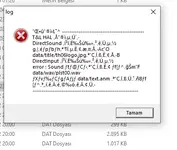
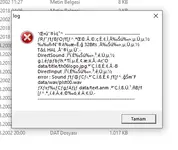
If you get an error and it's gibberish, you might need to emulate Japanese locale for the game or set your system locale as Japanese (might need PC restart). I've never used it myself, but Locale Emulator exists that I've heard others use.

If the error mentions Direct3D, a missing d3dx dll file, or something about dll injection, it's a DirectX error. Either you should reinstall the DirectX runtime, or more preferably for the game, use d3d8to9 or DXVK, which should come with some improvements besides fixing the error, like better input delay. To use it, you would want to put the d3d8.dll (or d3d9.dll if playing th10 or above and using DXVK) into the game's folder. For DXVK, the dll from the x32 folder if the game is 32bit, and x64 if it's 64bit.
d3d8to9 is only for Touhou 9.5 and below. If your device doesn't support the latest Vulkan, you can also use an older version of DXVK, like 1.10.3, 2.6.2, etc.

If the game still doesn't start, you could look around in Windows Event Viewer to troubleshoot. If you're on another OS, I'd be happy to try to help.

If the game runs but with too much FPS (or maybe too low?), or with messy textures, d3d8to9 or DXVK should fix it.

If you want to change the controls on keyboard, there's this thcrap mod. Alternatively, you could also use key rebinding scripts. You can do that with AutoHotkey, or other programming language scripts.
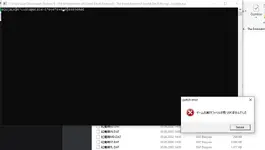
ı need a bit of help(ı tried the japan emulater thing)1763566192976.webp
 
Last edited:
ı need a bit of help(ı tried the japan emulater thing)
The vpatch error says it can't find the executable, or something like that. Could you try re-unzipping the game and trying again? If it still won't work, try running vpatch.exe directly and also the 東方紅魔郷.exe to see if those will work.
 
ı tried running them directly but ts pops
The vpatch error says it can't find the executable, or something like that. Could you try re-unzipping the game and trying again? If it still won't work, try running vpatch.exe directly and also the 東方紅魔郷.exe to see if those will work.
up1763569668819.webp
 

Attachments

  • Ekran görüntüsü 2025-11-20 012650.webp
    Ekran görüntüsü 2025-11-20 012650.webp
    25.4 KB · Views: 0
Please check your Antivirus first before troubleshooting; it deletes executables at the slightest notion.
 
Back
Top