Navigation
Install the app
How to install the app on iOS
Follow along with the video below to see how to install our site as a web app on your home screen.
Note: This feature may not be available in some browsers.
More options
You are using an out of date browser. It may not display this or other websites correctly.
You should upgrade or use an alternative browser.
You should upgrade or use an alternative browser.


FlandreAeonia
Onshi
I followed the steps of the readme file, but it shows me the japonese window. Can anyone help me?

Takemikazu
Onshi
hi is there a way to add the hitbox of the character? and thx i can play touhou 6
I downloaded the file and extracted and ran thcrap to install the english language patch. When I run the th06 (en) shortcut I get an error from thcrap that says it failed to find vpatch.exe. Any idea what to do? Also I can't find this readme file ya'll have been mentioning literally anywhere.
Edit: I was able to fix this by downloading the specific vpatch for th06 file from thpatch.net . Not totally sure if links are allowed on this forum as I'm super new but this is the link to the download I used from the thpatch website: Vpatch for TH6 . Just extract this into the main EOSD directory.
P.S. Just 1cc'd the game on normal with MarissaB on my first try with her This was my second attempt at all with any character, my first run ended on stage 5 with ReimuA but I continued enough to see most of the final boss patterns. On my clear though it was my first time seeing the final pattern and I clutched it with no lives no bombs left!!!!!!!
Edit: I was able to fix this by downloading the specific vpatch for th06 file from thpatch.net . Not totally sure if links are allowed on this forum as I'm super new but this is the link to the download I used from the thpatch website: Vpatch for TH6 . Just extract this into the main EOSD directory.
P.S. Just 1cc'd the game on normal with MarissaB on my first try with her
This was my second attempt at all with any character, my first run ended on stage 5 with ReimuA but I continued enough to see most of the final boss patterns. On my clear though it was my first time seeing the final pattern and I clutched it with no lives no bombs left!!!!!!!
Last edited:


Sanae10Koichiya
Onshi
I can"t see the hitbox , what do i need to fix this ?
getting that same error
Someone knows how to fix the issue with this error?
View attachment 9727


In case the game isn't working:
You could try restarting your PC, it's the easiest and sometimes fixes it, though not usually.
If you get an error and it's gibberish, you might need to emulate Japanese locale for the game or set your system locale as Japanese (might need PC restart). I've never used it myself, but Locale Emulator exists that I've heard others use.
If the error mentions Direct3D, it's a DirectX error. Either you should reinstall the DirectX runtime, or more preferably, use d3d8to9 or DXVK, which should come with some improvements besides fixing the error, like better input delay. To use it, you would want to put the d3d8.dll into the game's folder. For DXVK, the d3d8.dll from the x32 folder.
If the game runs but with too much FPS (or maybe too low?), or messy textures, d3d8to9 or DXVK should fix it.
You could try restarting your PC, it's the easiest and sometimes fixes it, though not usually.
If you get an error and it's gibberish, you might need to emulate Japanese locale for the game or set your system locale as Japanese (might need PC restart). I've never used it myself, but Locale Emulator exists that I've heard others use.
If the error mentions Direct3D, it's a DirectX error. Either you should reinstall the DirectX runtime, or more preferably, use d3d8to9 or DXVK, which should come with some improvements besides fixing the error, like better input delay. To use it, you would want to put the d3d8.dll into the game's folder. For DXVK, the d3d8.dll from the x32 folder.
If the game runs but with too much FPS (or maybe too low?), or messy textures, d3d8to9 or DXVK should fix it.
Last edited:

Colly_
Onshi
Single digit detections arent a virus.. The reason virustotal thinks its a trojan is because it creates a patch that makes the game in english and fixes some bugs.uh this download trojan too
keroninvasion
Onshi
This is the only thing that worked for me, none of the other prior suggestions on this thread or the main page workedHey for those struggling to get it to run, DO NOT rename the Japanese exe file,even if the readme.txt file says you should, don't.

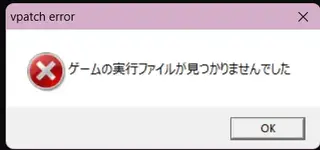
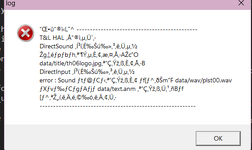
Did you rename the Touhou executable? The readme is outdated and that isn't needed, try naming it back if you did.I am getting both of these, on on the thpatch-en and the other on just the renamed japanese to english file th06.exe, i am confused help plzz
Though I'll be honest, I also managed to get that second error message before, and I don't know what causes it or how to fix it. But I'll try to help if renaming the executable back doesn't make the game work.

lyn_fox
meheheheheh
did you get it working?I can"t see the hitbox , what do i need to fix this ?
Here's most of the steps I took to make it work:did you get it working?
Launch thcrap.exe in the thcrap folder
Click next once and proceed with the new installer
Select "all patches" and wait until it loads
Use the search box and search for "hitbox," then find the patch and add it
Perhaps combine it with other Touhou mods if they work. I removed the Japanese language it offered me by default because I just wanted to test if those worked
Select your EoSD (I selected both custom and the normal one)
And create a shortcut for your thing somewhere in thcrap. Then use that shortcut to launch the game. It worked with my setup, but it may be incompatible with some other mods.
lyn_fox
meheheheheh
thanks sm i found a always visible hitbox patch but i was wondering if there was a focus only hitbox patch for eosd withing thcrapHere's most of the steps I took to make it work:
Launch thcrap.exe in the thcrap folder
Click next once and proceed with the new installer
Select "all patches" and wait until it loads
Use the search box and search for "hitbox," then find the patch and add it
Perhaps combine it with other Touhou mods if they work. I removed the Japanese language it offered me by default because I just wanted to test if those worked
Select your EoSD (I selected both custom and the normal one)
And create a shortcut for your thing somewhere in thcrap. Then use that shortcut to launch the game. It worked with my setup, but it may be incompatible with some other mods.

Ghossttoast
Onshi
whenever i try to open it through the th06patch it doesnt open the game tanks my pcs graphics until i restart it for some reason i got it working for a bit earlier but now its back to being buggy </3