• Touhou 6 New Classic Score Attack Ongoing!

    Read the submission rules, prizes and everything inbetween here:

    Good luck!

    Also check out the community art event here! Everyone is welcome!

Touhou Troubleshooting (Mainline+Spinoff)

my mouse pointer starts flickering whenever i launch th7 and the game itself wont open
No error message? But either way, the two most common errors tend to be either from DirectX 8 or not having Japanese locale, so you could try getting d3d8to9/DXVK and setting system locale to JP/using Locale Emulator, and see if that fixes it. If not, maybe sfc /scannow in an admin cmd/powershell
 
I got th6 to run but when I open the game it just goes into the game at insane spped with no controls and if I press a key it goes into the start menu but I hve to hold it down and also the spped at wich I cycle through the options with if I just lightly tap the up or down Key ist lso crazy fast
I tried to attach a video of it but its to large

has anyone a clue what could be wrong
The crazy speed should probably be fixed if you apply d3d8to9 or DXVK. But maybe you're running the game without vpatch, since I think it should also be able to limit FPS (which is connected to game speed). In my vpatch.ini, it's set to 60. I think if the game is from Moriya, it should be using vpatch by default if you launch either with vpatch.exe or th06 (thpatch-en).exe
 
The crazy speed should probably be fixed if you apply d3d8to9 or DXVK. But maybe you're running the game without vpatch, since I think it should also be able to limit FPS (which is connected to game speed). In my vpatch.ini, it's set to 60. I think if the game is from Moriya, it should be using vpatch by default if you launch either with vpatch.exe or th06 (thpatch-en).exe
It works normal now when I run it with vpatch.exe, because bevore I startet it with the 東方紅魔郷.exe
Thanks
 
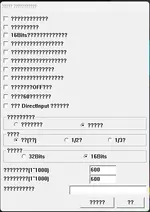
How do I start the game in windowed mode? Also, when I open custom.exe, all of the text here is in complete gibberish with question marks.
1781129603636.webp
 
Last edited:
How do I start the game in windowed mode? Also, when I open custom.exe, all of the text here is in complete gibberish with question marks.
I didn't have the Japanese characters show up either, until I installed Japanese fonts. If your game has vpatch, you can go into vpatch.ini and AskWindowMode = 1 works. From custom.exe, I think fullscreen and windowed options should be the one above "1/2?"
 
I managed to fix the DXVK error, but now instead of an error window the game just doesnt launch, just gives me the loading and cmd windows but after that its just nothing (im trying 2 play TH 7)
 
Last edited:
I managed to fix the DXVK error, but now instead of an error window the game just doesnt launch, just gives me the loading and cmd windows but after that its just nothing (im trying 2 play TH 7)
That's weird. You could try and check Windows Event Viewer for logs, but I have some ideas, mostly common fixes.
Try and run the unpatched Japanese exe, and vpatch.exe to see if those work
Try running the game in windowed mode (probably through vpatch really, you can edit vpatch.ini and put AskWindowMode to 1, then run the game with vpatch.exe)
You could try putting your system locale to Japanese or using Locale Emulator.
And are you sure your GPU supports the DXVK version? But DXVK Windows support is not a priority since 2.7, so even if it does, maybe you could try a version before it.
 
how do i get the launcher to work with this? i can get th6 to run now by right clicking th06.exe and clicking run in japanese (i had to run th06 custom (thpatch-en).exe and click the run game button which gave me a settings prompt where i put the game into windowed) but the launcher still doesnt work and the window is very small. is there a way to get it to run from the launcher and in a larger window?
 
how do i get the launcher to work with this? i can get th6 to run now by right clicking th06.exe and clicking run in japanese (i had to run th06 custom (thpatch-en).exe and click the run game button which gave me a settings prompt where i put the game into windowed) but the launcher still doesnt work and the window is very small. is there a way to get it to run from the launcher and in a larger window?
I don't know which/what launcher you're talking about, but regarding the window size: you get a settings prompt to put the game in windowed. If you don't put it in windowed, doesn't it go into fullscreen? If that isn't satisfactory, you could edit the resolution set in vpatch.ini, or alternatively set up Magpie.
 
I don't know which/what launcher you're talking about, but regarding the window size: you get a settings prompt to put the game in windowed. If you don't put it in windowed, doesn't it go into fullscreen? If that isn't satisfactory, you could edit the resolution set in vpatch.ini, or alternatively set up Magpie.
im using the launcher thats in the tools part of this website and keeping it on fullscreen just doesnt work for some reason. i was getting the directsound error thing iirc until i put it in windowed which made it run for some reason
 
im using the launcher thats in the tools part of this website and keeping it on fullscreen just doesnt work for some reason. i was getting the directsound error thing iirc until i put it in windowed which made it run for some reason
Alright. Try editing the resolution set in vpatch.ini, and you might achieve what you want. Resolution is the Width and Height option. You could try applying d3d8to9 or DXVK to see if it fixes your issue with fullscreen or not, though I'm guessing it wouldn't.
 
I didn't have the Japanese characters show up either, until I installed Japanese fonts. If your game has vpatch, you can go into vpatch.ini and AskWindowMode = 1 works. From custom.exe, I think fullscreen and windowed options should be the one above "1/2?"
Will any changes on the settings for custom.exe still work even with the question marks?
 
Will any changes on the settings for custom.exe still work even with the question marks?
I believe they should, if you press the right buttons.
By the way, from what I heard, custom.exe has some sort of reset to defaults button inside it, but using it can break something, so don't use it lol
 
Hey guys! I'm having an audio issue with all of the Touhou games currently. Touhou was working perfectly fine before, but I had to reinstall windows onto my computer because something corrupted. After I reinstalled windows, Touhou doesn't play audio anymore. Any thoughts?
 
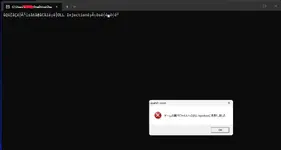
Everytime I try to run the game it runs too fast and I get the error message below. I've tried using both d3d8tod9 and DXVK btw.
 

Attachments

  • Screenshot 2026-07-08 073514.webp
    Screenshot 2026-07-08 073514.webp
    16.8 KB · Views: 0
Im having an issue with the games 6 7 8 and 15 all crashing after a certain period of time within the game. It can be somewhat consistent timing but also not really. I dont have any random popup telling me what it is, it just freezes and closes the game. Ive tried a bunch of fixes or tweaks like changing around the custom patch settings, using fullscreen/window, changing vsync, download the d3d8, running admin, restarting. I have no idea what it could be. If anyone has any ideas please do let me know. 8 Oddly enough is the only one ive been able to play fully once without any issues.
Hey, did you ever get a fix for this? I've been having the same issue, when checking the logs it either shows "Exception C0000005" or "Exception C0000374". Doesn't always happen when playing, but sometimes it's fairly soon after starting and other times it takes a while.
 
Hey, did you ever get a fix for this? I've been having the same issue, when checking the logs it either shows "Exception C0000005" or "Exception C0000374". Doesn't always happen when playing, but sometimes it's fairly soon after starting and other times it takes a while.
In their case, I think it was a RAM issue that was solved with a BIOS update (they also said that they changed some security settings, but that may have been irrelevant). I think they also had the same errors. Before they updated their BIOS, DXVK made them be able to go just slightly further in the game. And their game was less prone to crashing when running from vpatch.exe. But here are some things that were recommended.
Using Memtest86+ to test memory
Running sfc /scannow in an admin cmd/powershell in case the file or something was just corrupt
I think some sort of DISM command may also have been suggested, like dism /online /cleanup-image /restorehealth , though I don't remember.
But in their case it was the BIOS update that fixed it. I just wouldn't particularly recommend updating BIOS on a system with funny RAM, if that's the issue. If your RAM itself is faulty, but you have multiple sticks, it might be that only one has an issue.
 
In their case, I think it was a RAM issue that was solved with a BIOS update (they also said that they changed some security settings, but that may have been irrelevant). I think they also had the same errors. Before they updated their BIOS, DXVK made them be able to go just slightly further in the game. And their game was less prone to crashing when running from vpatch.exe. But here are some things that were recommended.
Using Memtest86+ to test memory
Running sfc /scannow in an admin cmd/powershell in case the file or something was just corrupt
I think some sort of DISM command may also have been suggested, like dism /online /cleanup-image /restorehealth , though I don't remember.
But in their case it was the BIOS update that fixed it. I just wouldn't particularly recommend updating BIOS on a system with funny RAM, if that's the issue. If your RAM itself is faulty, but you have multiple sticks, it might be that only one has an issue.
Hm, I did the scan and DISM stuff but I don't believe it helped. Will have to test the memory though!
 
Back
Top