Touhou Troubleshooting (Mainline+Spinoff)

I've been attempting to run th07 and I've followed the instructions to what I believe to be the fullest, and I still get a "Failed to initialize Direct3D, the game cannot start." I followed guides to ensure my windows, drivers, and directx are up to date, visual c++ is installed, and that my graphics card is enabled. If it's importing the d3d8tod9 file or adjacent to the game folder, I also tried that but may have put it in the wrong spot (I've no real clue what I'm doing). I did also try changing the refresh rate to see if it'd work, of which it didn't. Is there something I'm missing?
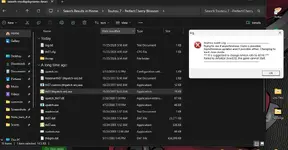

image_2026-11-25_040319351.webp
 
Last edited:
So... Any idea what could be the issue? And any possible way to fix it? The games worked fine 2 years ago which is what puzzles me the most
I have a similar issue with the older games (game constantly detecting "up" input in the menu), and in my case it was controller related. I had a controller connected but it was set to XInput mode, and I couldn't use the controller either. When I switched the controller to DirectInput, the issue stopped and the controller was working correctly. See this thread for some DirectInput-related resources shared by others: https://moriyashrine.org/threads/any-way-to-connect-older-games-to-controller-without-steam.3504/

If you don't have any controller etc. plugged in, it is probably a different issue though, sorry I can't help much there.
 
I've been attempting to run th07 and I've followed the instructions to what I believe to be the fullest, and I still get a "Failed to initialize Direct3D, the game cannot start." I followed guides to ensure my windows, drivers, and directx are up to date, visual c++ is installed, and that my graphics card is enabled. If it's importing the d3d8tod9 file or adjacent to the game folder, I also tried that but may have put it in the wrong spot (I've no real clue what I'm doing). I did also try changing the refresh rate to see if it'd work, of which it didn't. Is there something I'm missing?
Just to confirm, you did unzip/extract the zip file somewhere rather than just opening it, right?
If so, d3d8to9 has to go where you are in the screenshot.
If that also isn't the problem, you could try emulating Japanese locale or putting system locale to Japanese. And/or trying to launch the game in windowed mode (you can edit vpatch.ini for that and put AskWindowMode to 1. You can edit Width and Height to customize the resolution, AlwaysOnTop being on 1 should prevent the taskbar from getting in the way. Though depending on the resolution, the game might end up looking stretched).
 
Last edited:
Back
Top