• Touhou 6 New Classic Score Attack Ongoing!

    Read the submission rules, prizes and everything inbetween here:

    Good luck!

    Also check out the community art event here! Everyone is welcome!

Does anyone knows how to make thcrap work on linux?

Leondrio

Onshi
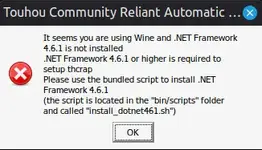
Using Wine I can make the games play normaly, but to use thcrap, it gives a different error depending on what I use wine to open, but this is what appears with the "thcrap.exe", the alread downloaded english patch, just doesnt open saying that it couldnt load it (I am new to linux, so if anyone knows how to fix this please help me)
 

Attachments

  • 1778413575122.webp
    1778413575122.webp
    10.8 KB · Views: 0
Using Wine I can make the games play normaly, but to use thcrap, it gives a different error depending on what I use wine to open, but this is what appears with the "thcrap.exe", the alread downloaded english patch, just doesnt open saying that it couldnt load it (I am new to linux, so if anyone knows how to fix this please help me)
Upon merely looking at the error message, I'd guess you need to install Wine's Mono. It says you can do it at /bin/scripts with install_dotnet461.sh, you can use your file manager to navigate there. It's outside of /home though. I think if you drag that file into a terminal and press enter, it should run the script (though you might first need to mark it as executable. On KDE I can do it with right click, Properties, and in Permissions with "Allow executing file as program". If your DE isn't KDE, it might have a similar setting at a similar place. If not, there's a terminal command you could use on the file instead).
 
Upon merely looking at the error message, I'd guess you need to install Wine's Mono. It says you can do it at /bin/scripts with install_dotnet461.sh, you can use your file manager to navigate there. It's outside of /home though. I think if you drag that file into a terminal and press enter, it should run the script (though you might first need to mark it as executable. On KDE I can do it with right click, Properties, and in Permissions with "Allow executing file as program". If your DE isn't KDE, it might have a similar setting at a similar place. If not, there's a terminal command you could use on the file instead).
I did this and it says this "
Error: winetricks is not installed, aborting
"
 
I did this and it says this "
Error: winetricks is not installed, aborting
"
You could try installing winetricks, it's likely in your package manager. When I searched it up in my GUI store (KDE's Discover), I couldn't find it on Fedora, but it worked in the terminal. If you're on a Debian/Ubuntu based distro, you should be able to do "apt search winetricks" to check, and then probably "sudo apt install winetricks". Though I did make the assumption that you got your Wine from your ordinary package manager, not something like Flatpak or Snap.

When I used Bottles (com.usebottles.bottles) from Flathub, I got org.winehq.Wine.mono for it (25.08) and I think it makes use of it by default? Since it tells me it uses it when I prompt to delete it. For what I think was a fork of it that didn't want to make use of Mono, I would get a prompt about installing it or not when first messing with the installed Wine.

Since you're new to Linux, in case you're unaware, I will recommend considering the use of some sort of game launcher over normal Wine, since they tend to set some nice things up (like DXVK and VKD3D-Proton), and make some configuration easier. But that's just a recommendation. I personally like Bottles and Heroic Games Launcher the most.
 
You could try installing winetricks, it's likely in your package manager. When I searched it up in my GUI store (KDE's Discover), I couldn't find it on Fedora, but it worked in the terminal. If you're on a Debian/Ubuntu based distro, you should be able to do "apt search winetricks" to check, and then probably "sudo apt install winetricks". Though I did make the assumption that you got your Wine from your ordinary package manager, not something like Flatpak or Snap.

When I used Bottles (com.usebottles.bottles) from Flathub, I got org.winehq.Wine.mono for it (25.08) and I think it makes use of it by default? Since it tells me it uses it when I prompt to delete it. For what I think was a fork of it that didn't want to make use of Mono, I would get a prompt about installing it or not when first messing with the installed Wine.

Since you're new to Linux, in case you're unaware, I will recommend considering the use of some sort of game launcher over normal Wine, since they tend to set some nice things up (like DXVK and VKD3D-Proton), and make some configuration easier. But that's just a recommendation. I personally like Bottles and Heroic Games Launcher the most.
ok I downloaded this winetrick, and now the .net framwork is downloaded, but now thcrap doesnt open, it doesnt even display an error
 
run thcrap.exe in the terminal, there may be an error message
if you're located in the thcrap directory, run it with "wine thcrap.exe"
paste what you get here
 
run thcrap.exe in the terminal, there may be an error message
if you're located in the thcrap directory, run it with "wine thcrap.exe"
paste what you get here
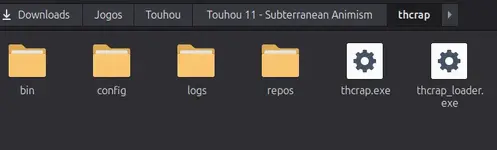
I placed wine thcrap.exe in the terminal and it says that the archive doesnt exist1778439625783.webp

but I have it downloaded 1778439666313.webp
 
I placed wine thcrap.exe in the terminal and it says that the archive doesnt existView attachment 13370

but I have it downloaded View attachment 13372
you may need to run 'cd "~/Downloads/Jogos/Touhou/Touhou 11 - Subterranean Animism/thcrap" ' beforehand
it changes the current working directory of the terminal to thcrap where the exe is. wine couldn't find thcrap.exe as the terminal was in the wrong directory (likely home)
 
you may need to run 'cd "~/Downloads/Jogos/Touhou/Touhou 11 - Subterranean Animism/thcrap" ' beforehand
it changes the current working directory of the terminal to thcrap where the exe is. wine couldn't find thcrap.exe as the terminal was in the wrong directory (likely home)
I did this, but it says this (had to cut it in 2 parts)
1778440640838.webp1778440658494.webp
 
I did this, but it says this (had to cut it in 2 parts)
View attachment 13373View attachment 13374
mscoree.dll is the .NET framework DLL
looking online and it seems you should uninstall the wine-mono package with your package manager if present
if that doesn't work seems you have to add mscoree.dll as an "override" whatever that means, i don't know much about wine so i don't know how to
if you're stuck you can always use a search engine, e.g. "mscoree.dll not found wine"
 
ok I downloaded this winetrick, and now the .net framwork is downloaded, but now thcrap doesnt open, it doesnt even display an error
Huh...
You could try doing what touhougirlskissing said, but I think it could be simpler to try using a launcher+Wine fork to see if it would work with that. If you have Steam installed, you could even try that, by adding the game as a non-Steam game and selecting to run it with Proton in Properties, Compatibility IIRC (probably more ideally GE-Proton). One issue would be I don't know how to emulate locale with Steam, if that would be needed though.

I'll summon @lucie and see what she thinks.
 
Back
Top