

Navigation
Install the app
How to install the app on iOS
Follow along with the video below to see how to install our site as a web app on your home screen.
Note: This feature may not be available in some browsers.
More options
You are using an out of date browser. It may not display this or other websites correctly.
You should upgrade or use an alternative browser.
You should upgrade or use an alternative browser.

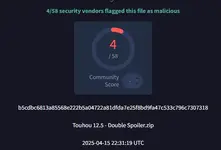
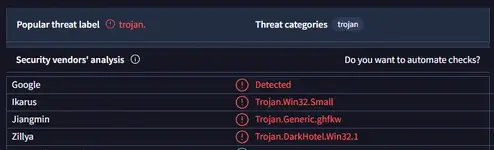

Hieða no Akyuu
Futatsuiwa
password is moriyashrine.org

This one doesn't have encryptionpassword is moriyashrine.org
Hieða no Akyuu
Futatsuiwa
it worked for me tho, even though its not encryptedThis one doesn't have encryption

alo4uahascsawebhc
throbbert
https://www.virustotal.com/gui/file/ccab7daf496abd477de335f508afb0c62e912d34ea8d58e2e93e5ab9291c8f81
2/72 for "th125 (thpatch-en).exe"
edit: although that usually means it uses windows API by accessing shell32 and other system files to call said API. most antiviruses mark this as "dangerous" due to it being unsigned and accessing the system files, which is a better safe than sorry approach. this approach marks the windows client for proton mail as dangerous for example.
2/72 for "th125 (thpatch-en).exe"
edit: although that usually means it uses windows API by accessing shell32 and other system files to call said API. most antiviruses mark this as "dangerous" due to it being unsigned and accessing the system files, which is a better safe than sorry approach. this approach marks the windows client for proton mail as dangerous for example.
Last edited:

If its not malware then why did Defender tackle it as soon as I opened the folder?

Because it has no signature and because the patcher modifies how other programs (the patched games) run.If its not malware then why did Defender tackle it as soon as I opened the folder?


Rei Ayanami 777
Onshi
if you name "custom.exe" to literally anything else, you can download it, it's weird, I don't know if renaming it affects anything tho

StarryusRage
Onshi
Does excluding the custom.exe folder also counts for deleting that folder to download the game?if you name "custom.exe" to literally anything else, you can download it, it's weird, I don't know if renaming it affects anything tho
If not, then how should I exclude the folder and allow it in my browser besides just changing the name of the folder?
Rei Ayanami 777
Onshi
sorry for the 11-day late responseDoes excluding the custom.exe folder also counts for deleting that folder to download the game?
If not, then how should I exclude the folder and allow it in my browser besides just changing the name of the folder?
I don't know entirely what you mean in your first question, but, with unfortunate news, I can answer your second one slightly, I unfortunately don't know the exact steps I took but I'll try to recall, you also don't HAVE to rename it
1. download
2. open/extract
3. if you get a virus detected notification, click it, click on the warning, set it to "allow on device" then click "start action"
4. should stay in the folder instead of being deleted
5. open it
6. should be in Japanese so you should only see some symbols and a ton of "???"
these steps may vary depending on the device
so, you don't technically need it but if you want to you can keep it
hope this helps a little
StarryusRage
Onshi
sorry for the 11-day late response
I don't know entirely what you mean in your first question, but, with unfortunate news, I can answer your second one slightly, I unfortunately don't know the exact steps I took but I'll try to recall, you also don't HAVE to rename it
1. download
2. open/extract
3. if you get a virus detected notification, click it, click on the warning, set it to "allow on device" then click "start action"
4. should stay in the folder instead of being deleted
5. open it
6. should be in Japanese so you should only see some symbols and a ton of "???"
these steps may vary depending on the device
so, you don't technically need it but if you want to you can keep it
hope this helps a little
Well, the problem is that when I do try to download it, (like just clicking the "Download" button) my Defender acts up on it. Do I have to turn off my Defender?

KNACKLES01
Onshi
i cant install it and when i turned off my anti virus it disappeared wtf???