Greetings, Moriya peeps. This post is to talk about our Matrix server and how to join it. I'll briefly go over the Matrix protocol, choosing a client, creating an account, and joining the Moriya Matrix server.
1. The Matrix protocol.
Matrix is an open source protocol, and used for federated messaging. It offers end-to-end encryption between clients for text messaging and for calls (though our server is unencrypted). It differs from centralized messaging platforms, in that data isn't necessarily concentrated in one place - it may flow through different "homeservers," potentially just one if not using federation. A homeserver may even be self-hosted.
2. Choosing a client and creating an account:
There are various clients, with the most popular one being Element. Choose one that you like, which has support for your operating system.
The next step I write would be creating an account on a homeserver. Just probably don't use the commonly default matrix.org homeserver. Here is a list of homeservers I found. You may be able to register to a homeserver from within your client, but if you run into an issue, it may be worthwhile to try registering from a different client (e.g. the Element web instance).
Moriya also offers its own moriyashrine.org homeserver, for which a registration token can be acquired from here if some requirements are met. Do note: At least currently, you can only register without attaching an email.
3. Joining the Moriya Shrine Matrix server:
A link to it is here. Matrix Rooms are somewhat similar to "Channels" on other platforms - join what interests you.
For a less brief walkthrough with screenshots, I will assume this Element web instance is being used. We have our own Element web instance here which should be very similar, though it does mandate a moriyashrine.org account.
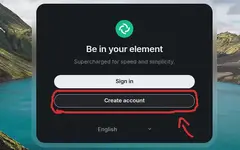
When you first enter the page, you should be seeing this. Assuming you don't have an account, click "Create account."
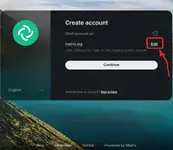
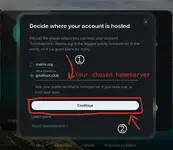
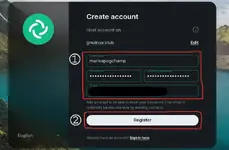
After, you'll see these. On the usual Element web instance, it will auto-select matrix.org, while on our own, moriyashrine.org. I recommend pressing "Edit" and changing matrix.org to a different homeserver, potentially from here. After, click "Continue," then fill out the "Username" and "Password" columns, potentially email if desired, or required by the homeserver (but not with a moriyashrine.org account), then click "Register". You might receive a captcha or an email confirmation.
After that, you should have an account. Though Element will ask about backing up your chats (making a decryption key, for encrypted messages) in the top left. I would probably recommend generating a recovery key and saving it somewhere safe, perhaps a password manager, but it isn't necessary.
After these, you should be able to join the Moriya Matrix from this link.
Thank you for reading!
- Deliverer
1. The Matrix protocol.
Matrix is an open source protocol, and used for federated messaging. It offers end-to-end encryption between clients for text messaging and for calls (though our server is unencrypted). It differs from centralized messaging platforms, in that data isn't necessarily concentrated in one place - it may flow through different "homeservers," potentially just one if not using federation. A homeserver may even be self-hosted.
2. Choosing a client and creating an account:
There are various clients, with the most popular one being Element. Choose one that you like, which has support for your operating system.
The next step I write would be creating an account on a homeserver. Just probably don't use the commonly default matrix.org homeserver. Here is a list of homeservers I found. You may be able to register to a homeserver from within your client, but if you run into an issue, it may be worthwhile to try registering from a different client (e.g. the Element web instance).
Moriya also offers its own moriyashrine.org homeserver, for which a registration token can be acquired from here if some requirements are met. Do note: At least currently, you can only register without attaching an email.
3. Joining the Moriya Shrine Matrix server:
A link to it is here. Matrix Rooms are somewhat similar to "Channels" on other platforms - join what interests you.
For a less brief walkthrough with screenshots, I will assume this Element web instance is being used. We have our own Element web instance here which should be very similar, though it does mandate a moriyashrine.org account.
When you first enter the page, you should be seeing this. Assuming you don't have an account, click "Create account."
After, you'll see these. On the usual Element web instance, it will auto-select matrix.org, while on our own, moriyashrine.org. I recommend pressing "Edit" and changing matrix.org to a different homeserver, potentially from here. After, click "Continue," then fill out the "Username" and "Password" columns, potentially email if desired, or required by the homeserver (but not with a moriyashrine.org account), then click "Register". You might receive a captcha or an email confirmation.
After that, you should have an account. Though Element will ask about backing up your chats (making a decryption key, for encrypted messages) in the top left. I would probably recommend generating a recovery key and saving it somewhere safe, perhaps a password manager, but it isn't necessary.
After these, you should be able to join the Moriya Matrix from this link.
Thank you for reading!
- Deliverer
Last edited:
