Due to popular demand and...current demographic, here's a guide for downloading a file here on the Shrine.
Do you just hate it when your favorite website gives you this?

Do you wish to play the games? Do you want to be an actual touhou fan? Well you're in luck, because we're gonna go over how to download a goddamn file!
- First of all, did you get into this screen? Good job! But staying logged out isn't gonna help us, so register (or log in if you already have an account).

- For that, click on the "Register" button. Yeah, that cute little button at the top, the one with the sharpie pen, click it.
- Amazing, now you're gonna get into this screen;
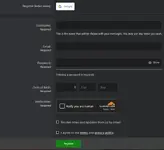
- Enter everything you need here, i really hope i don't need to spell it out for you, also agree to the terms and policies. Either this or login using your Google Gmail account (also don't accidentally use your real name as a username, please?)
- Now your account is waiting for approval, no it's not us ghosting your privilege of downloading the hou, just wait for a bit.

- After you got approved, you can finally use your account! Now time for the reason you're here for, the games.
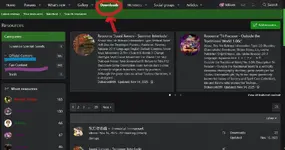
- Move over to the download section, the red sharpie one.
Now i know it's too much going on for your eyes over here, but all you need to know are the blue sharpie page and the purple sharpie page.
*The blue sharpie is for OFFICIAL CONTENT, that means stuff that is made and/or associated by ZUN, that's where you're gonna find the games.
*The purple sharpie is for FAN CONTENT, that means stuff that is made by FANS, and has FAN content.
"Oh what about that Suwako pag-" shh, class' in session. - Let's try and download Touhou 12, for that you go down the sharpies, so that means: (Official Content -> Games -> 2nd Windows Generation)
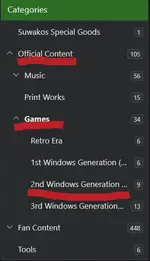
- And wouldn't you know, after clicking on touhou 12, the download page is RIGHT THERE! Now click on the download button.

- We'd be done here, but just for your viewing pleasure, let's actually run this game, grab your archive that you downloaded, then extract it.
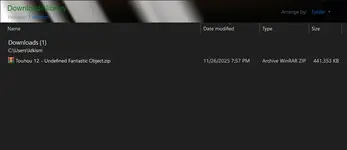
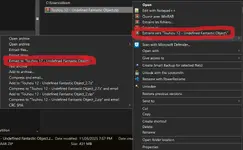
- ...oh yeah i gotta talk about extracting, uhh get winrar or 7zip, right click your archive and extract (choose one of the two, depending on your software)
- launch the "th12 (thpatch-en).exe" and wait for thcrap to update, and please for the love of God himself don't pester with "virus scans", it's a fucking crack not magic, the reason why there are false positives in the first place is because the scanning algorithms detect anything that's not official, and ZUN's code is highly butchered to the point you get false positives, please get this through your heads.
- And voila! now play the games.






