I went and actually looked at the wiki. It seems simple more or less. I can't test it since I don't have an account, but hopefully I'll be able to help without making one. Soo... which part are you stuck on?
For starters, the first part means your browser language should the same as the language you want to translate to in order to avoid unhappy accidents. Should be somewhere in your browser > 'Settings' > 'Languages' > 'Preferred languages' and maybe also 'Move to Top' if you have a few.
Log in and this should

automatically show the language you will be translating to. If it doesn't, click it and check if it's on the list.
If it isn't, contact them on Discord.
Edit: Part 2, go back to main page, pick a game, pick which part you will be translating. For example in EoSD, let's pick Reimu's story.
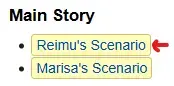
You'll end up on Japanese page, there should be a small 'Translate this page' somewhere that you have click. In my case, I don't have an account so I'll use a translated page as an example. When a translation already exists, it'll look like this.

The page you are on should look like this. If it doesn't
Important! Change this to your language. In this example I picked a random untranslated one.
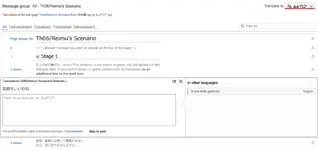
Click a row and get to translating! The interface is self explanatory I assume, remember to click 'Publish translation' when you fill out a row.
After that only
- If any text of an existing translation (again, most likely English) would not change in your translation, leave the respective box empty and don't copy-paste the text. This way, everyone can take full advantage of patch stacking.
- Line breaks are never done automatically. It's up to you to make sure that the text fits into the dialog box.
- You can always use a maximum of two lines for every message box, even if there is only one line in the original. The opposite is also true. We went to great lengths to make this possible, so please do make use of this. ☺
seem to be things worth of note from the tutorial.
That's it for text translations.

