startistics
Onshi
im on chachyOS(arch based os) all my touhou games have run fine on lutris with wine but when i try open th10 it just opens an empty window 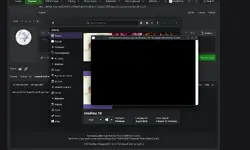
Follow along with the video below to see how to install our site as a web app on your home screen.
Note: This feature may not be available in some browsers.
go to task manager end the tast and restart the gameWith Shoot the bullet english patch it is saying two instances message I am pretty dure you know what I am talking about, it's the only one I am having problems with, is there a way to fix it?
Did that a few times, might see if the jp version works, will suck do to not being able to read but at least I might be able to play it, I did as I said keep doing that each time I did lunch the game my laptop lagged and got that message so I had to shut it off, and try again, might just have to wait for my pc to arrive sense it could just be a problem with my laptop, but thank you for the advice I do appreciate it!go to task manager end the tast and restart the game
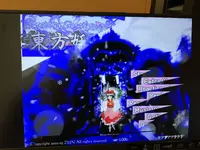
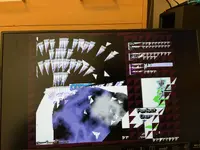
I learned if it recommends a certain size just use the recommend size if it shows you options without a recommend just choose the one the black dot is already on, and most of all don't click don't show this again because when I did could not find a way to change out of full screen. It's a pain when it starts causing problems because I wanted full screen not worth it in my opinion.View attachment 14478
View attachment 14479
Something is happening when I'm playing on fullscreen (its normal when it's windowed), I tried everything and put d3d8 and vpatch in the game folder, nothing is working and I don't want to play in windowed. What do I do?

I don't use Lutris anymore, but you could try looking at logs somewhere. I think if you right click your Touhou 10 column on Lutris, you'll have a logs option, IIRC. But if you're just using normal Wine, I'd recommend trying to run it with Proton-CachyOS - should be installed for you if you installed the meta gaming package from CachyOS Hello, I think. I think you'll also be able to use the environmental variable PROTON_LOG=1 for logging with it, in case Lutris won't have logs.im on chachyOS(arch based os) all my touhou games have run fine on lutris with wine but when i try open th10 it just opens an empty window
I'm pretty sure that's a DirectX issue. Either you could try reinstalling DirectX, or perhaps also trying DXVK if your hardware supports it. I'm leaning more towards the reinstall, assuming you applied d3d8to9 correctly.View attachment 14478
View attachment 14479
Something is happening when I'm playing on fullscreen (its normal when it's windowed), I tried everything and put d3d8 and vpatch in the game folder, nothing is working and I don't want to play in windowed. What do I do?
Custom.exe and vpatch.ini have some options for turning on windowed mode, so those might make it work? Alt+Enter might also put you out of fullscreen while in the game, though not sure.I learned if it recommends a certain size just use the recommend size if it shows you options without a recommend just choose the one the black dot is already on, and most of all don't click don't show this again because when I did could not find a way to change out of full screen. It's a pain when it starts causing problems because I wanted full screen not worth it in my opinion.
Gotcha thanksCustom.exe and vpatch.ini have some options for turning on windowed mode, so those might make it work? Alt+Enter might also put you out of fullscreen while in the game, though not sure.
I just realized, the window title is a path that starts with X:\. Is it the same for the other Touhou games?im on chachyOS(arch based os) all my touhou games have run fine on lutris with wine but when i try open th10 it just opens an empty window
Tried both, and also tried reinstalling the game, nothing is still working out.I'm pretty sure that's a DirectX issue. Either you could try reinstalling DirectX, or perhaps also trying DXVK if your hardware supports it. I'm leaning more towards the reinstall, assuming you applied d3d8to9 correctly.
i forgot to mention, It works fine when changed to windows modeTried both, and also tried reinstalling the game, nothing is still working out.
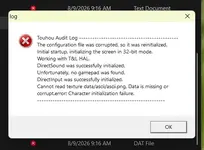
That aside, my touhou 6 is also having this message when I try to open it:View attachment 14483
I have a section on the T&L HAL error in my first message, but if you can't get fullscreen working, in vpatch.ini, you could try editing Width and Height (resolution) to your display resolution (or whatever preferred resolution), and putting AlwaysOnTop to 1, then playing like that in windowed mode.i forgot to mention, It works fine when changed to windows mode
You could try re-extracting the ZIP, maybe making a new English patch through thcrap.exe if it still won't work.I am no longer getting the two instances can't run at the same time stuff for shoot the bullet but the thpatch-en not working for me, it the only one out of them that's not working it does bring up my terminal but nothing happens but the slow down and lag of my laptop, when I am able to try it on my new pc coming sometime this month I will see if it's a problem with my laptop, but if anyone got any ideas or suggestions that would be appreciated, thank everyone for there time and hope everyone has a great day. Edit here, JP version works perfectly, EN is just well broken does not work.
Everything is working now, thank you for your help on this as well as the window size thing!You could try re-extracting the ZIP, maybe making a new English patch through thcrap.exe if it still won't work.
View attachment 14507I have a section on the T&L HAL error in my first message, but if you can't get fullscreen working, in vpatch.ini, you could try editing Width and Height (resolution) to your display resolution (or whatever preferred resolution), and putting AlwaysOnTop to 1, then playing like that in windowed mode.
Also, could you perhaps send a screenshot of your Touhou 7 folder? I want to make sure if d3d8to9/DXVK was applied correctly. Also, did you extract the .zip?
I'm not really sure what the issue is, but I'll throw out some ideas.I extracted my zip, and the same weird texture issues are also slowly getting my games after touhou 7 like touhou 10 (only a full screen issue) that were just working just fine days before.