• Touhou 6 New Classic Score Attack Ongoing!

    Read the submission rules, prizes and everything inbetween here:

    Good luck!

    Also check out the community art event here! Everyone is welcome!

Touhou Troubleshooting (Mainline+Spinoff)

I've managed to get it working! The things I did:

- Installed locale emulator (need to run the .exe to play)
- Put d3d8 on game folder
- Open the Settings:
- Set FPS to 60
- Change from Fullscreen to Windowed
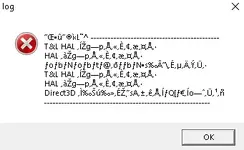
also worked for me, even though the error was something about "T&D LAL". Thanks mate!
 
th19 1.10c patched with thcrap crashes on lauch, it doesn't even show anything so I have no idea what might be causing it. Unpatched still runs just fine (but I want translation and keymapper). What do I do? Did anyone have same problem?
 
I can't believe that I actually have to write this but when you download a zip file You HAVE TO EXTRACT ALL THE FILES from it or the game won't work/work properly.
 
Having trouble running Touhou 6, seems to specifically be Vpatch. This is me trying to run it standalone with locale emulator. The base game itself works with Locale Emulator, but I don't understand Japanese and would really like the translation.
I'm on Windows 10, I've installed locale emulator and DXVK 2.6.2. Any help appreciated!
1768494603404.webp
 
Having trouble running Touhou 6, seems to specifically be Vpatch. This is me trying to run it standalone with locale emulator. The base game itself works with Locale Emulator, but I don't understand Japanese and would really like the translation.
I'm on Windows 10, I've installed locale emulator and DXVK 2.6.2. Any help appreciated!
Update, don't rename the EXE like the English Readme tells you to. Google translate'd the error message and found out what I needed to know.
 
View attachment 12430
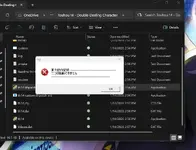
This error appears whenever I try to open touhou games 14-16. I don't get a window asking which resolution to play on beforehand.

I'm on a windows 11 laptop.
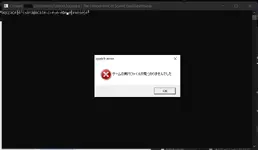
My translator says:
"Touhou Operation Log
Two cannot be launched"

Have you made any modifications to the games? Even if not, maybe try reunzipping them? You could also try and see if the games start without thcrap and vpatch by running vpatch.exe (for only without thcrap) and th(14-15-16).exe for also without vpatch.
You could try Japanese locale if you haven't, as it's a common fix. But my intuition (not experience, could also be wrong) leans more on some file being corrupted. Maybe the Windows Event Viewer would have some info? There's also log.txt in the Touhou folder.


Edit: Wait, I misunderstood. I think it means "two instances cannot be launched", perhaps? Maybe try restarting your PC, or using task manager to stop Touhou if it's there.
 
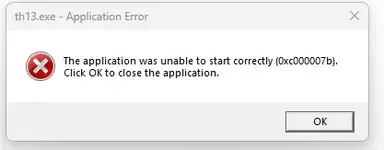
Im trying to run Touhou 13 and I get this message; any help will be appreciated :)
 

Attachments

  • image_2026-01-16_181706015.webp
    image_2026-01-16_181706015.webp
    6.3 KB · Views: 0
Im trying to run Touhou 13 and I get this message; any help will be appreciated :)
I vaguely recall seeing this error before, but I don't remember the solution, plus maybe it wouldn't be applicable. But some ideas, though:
Try running sfc /scannow in an admin CMD or PowerShell to look for some corrupted Windows files. Might need PC restart? This is my best idea.
You could also try applying DXVK, or reinstalling DirectX
And then I've also found a lot of other suggestions for that error on other websites. I don't know about their effectiveness, and I've got slight mixed feelings about some, but if none of these I listed fix the error, you could look up the error and look at other suggestions.
 
If the game doesn't start:

You could try restarting your PC, it's the easiest and sometimes fixes it, though not usually.

If you get an error and it's gibberish (and probably mentions DirectSound or DirectInput), you might need to emulate Japanese locale for the game or set your system locale as Japanese (might need PC restart). I've never used it myself, but Locale Emulator exists that I've heard others use.

If the error mentions Direct3D, a missing d3dx dll file, or something about dll injection, it's a DirectX error. Either you should reinstall the DirectX runtime, or more preferably for the game, use d3d8to9 or DXVK, which should come with some improvements besides fixing the error, like better input delay. To use it, you would want to put the d3d8.dll (or d3d9.dll if playing th10 or above and using DXVK) into the game's folder. For DXVK, the dll from the x32 folder if the game is 32bit, and x64 if it's 64bit.
d3d8to9 is only for Touhou 9.5 and below. If your device doesn't support the latest Vulkan, you can also use an older version of DXVK, like 1.10.3, 2.6.2, etc.

I don't have complete information on this, but if you get an error that mentions "T&L HAL", you could try putting the game to windowed mode through custom.exe or the vpatch config. You could edit the vpatch config to customize the size of the window. And if you have a screen that isn't 16:9, you could also try putting your screen to a 16:9 resolution in your display settings.

If the game still doesn't start, you could look around in Windows Event Viewer to troubleshoot. If you're on another OS, I'd be happy to try to help.

If the game runs but with too much FPS (or maybe too low?), or with messy textures, d3d8to9 or DXVK should fix it.

If you want to change the controls on keyboard, there's this thcrap mod. Alternatively, you could also use key rebinding scripts. You can do that with AutoHotkey, or other programming language scripts.
how to fix my game crash after 2 stages in touhou 6 dosent give any report the game just freezes for a second and closes?
is this normal???
 
how to fix my game crash after 2 stages in touhou 6 dosent give any report the game just freezes for a second and closes?
is this normal???
You could try looking around in Windows Event Viewer when the game crashes, I think, and you might get some information. But I have never used it before, so I likely wouldn't really understand it - you might. Running sfc /scannow in an admin CMD will look for corrupted Windows files, and hopefully alone fix them, but should need more commands if not. I would also try applying d3d8to9 or DXVK. And if none of those work, then I would try everything else, like Japanese locale, windowed mode, no vpatch/thcrap, and maybe reinstall some stuff.
 
1771747387323.webp
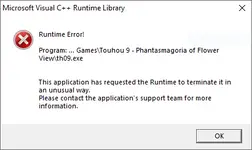
I recieved this error when trying to start Touhou 6 from the vpatch.exe. The problem is that my installation worked just fine for about a year but all of a sudden it stopped working the other day. I did not accept any windows updates in that time. Using the custom_e.exe I can fix the error by setting the game to run in windowed mode, but I would ideally like to play in fullscreen. Setting the mode back to fullscreen (both ingame and through custom_e.exe) causes the error to reappear. Any ideas on how I can get the game back to it's original state? And any theories as to how it got messed up in the first place?
 
I recieved this error when trying to start Touhou 6 from the vpatch.exe. The problem is that my installation worked just fine for about a year but all of a sudden it stopped working the other day. I did not accept any windows updates in that time. Using the custom_e.exe I can fix the error by setting the game to run in windowed mode, but I would ideally like to play in fullscreen. Setting the mode back to fullscreen (both ingame and through custom_e.exe) causes the error to reappear. Any ideas on how I can get the game back to it's original state? And any theories as to how it got messed up in the first place?
I really don't know why that error really happens, but I have a section written for the T&L HAL error, so you could try those options to fix it or get around it. I think I remember reading somewhere that d3d8to9 or DXVK can help somewhat with some fullscreen issues or things, so that could be worth a try, too.
(I always suggest those two so much... I don't have a complete picture of the errors and how they interact with different steps, so I do gotta "Random bullshit, go" it to see.)
 
text is coming out of the box for most of the games after 10 i heard it's a font issue but most of them don't have font files in them so where can i install these fonts or is there some other fix?
 
eosd crashes on launch with the hitbox patch on (it is specifically d3d8.dll that causes it)

It was working fine yesterday, I then installed directx legacy runtime to try and fix another issue, the game still worked with the hitbox patch applied but after restarting my computer it now opens then immediately closes on launch

I don't think I can revert the directx legacy installation, so I'm assuming it's just permanently broken

Is there another hitbox patch for eosd I can use?
 
Back
Top