• Touhou 6 New Classic Score Attack Ongoing!

    Read the submission rules, prizes and everything inbetween here:

    Good luck!

    Also check out the community art event here! Everyone is welcome!

Vpatch doesn't change resolution

Endodic

Onshi
Recently bought Touhou 10, and I've set it up with vpatch and thcrap, but the game never opens with the changed resolution I want.
- vpatch.ini is saved
- games.js has Touhou 10 set to open vpatch.exe
- opening either vpatch.exe or 'th10 (en).exe' don't change the resolution
What am I doing wrong?
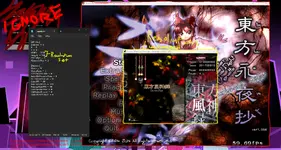
 

Attachments

  • vpatchhelp.webp
    vpatchhelp.webp
    283.4 KB · Views: 0
I can't much help (since i was never aware that Touhou have .ini option files) but maybe i can theorise that vpatch.ini is for some reason not working as it should
Did you try changing other options for testing wheter they also refuse to work?

also i have to ask...
Recently bought Touhou 10
Why did you Pay for Touhou 10 if you already pirated Touhou 8?
 
Most I tried was setting the X and Y values to the same numbers, but I'm not even sure if that did anything.
What I do think is happening is, despite 'enabled' being set to 1, it's disregarding vpatch.ini entirely (as such, even though I have 'AlwaysOnTop' set to 1, it's still covered by other programs.

Edit: Changing the e in 'enabled' to a capital didn't fix anything.
 
Now im trying that vpatch.ini file out to make my game easier (desperate cope of skill issue) by reducing my fps a little, and it seems like resolution isn't the only thing that doesn't work, i still see my fps being on 60.
It's prolly there is something else to do that we don't know, i feel like just chaning stuff in vpatch.ini and opening the game wont isn't all, what i find weird is that even after opening the vpatch.exe file the game still plays as if vpatch.ini wasn't changed at all
In advance i don't recommend checking on other files because i did it once and i had my options reseted (im afraid it will also reset whole game progress)
 
Hey if you're still having trouble, I just patched th10 recently so I might be of some help.

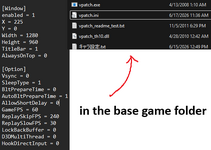
- These are the only vpatch files I've got in the base game folder, I had one more that looked like it belonged but the game wouldn't launch if it was there, so you might be fine there.
- If you got the game off of Steam, you might need to patch th10.exe to be the disk version due to there being built in Steam DRM on the file if you haven't done that already, vpatch doesn't work with the steam versions unless you do that.
- If you've already done all that, I've also included my settings for the game in case that might be the issue.
 

Attachments

  • th10 patch.webp.png
    th10 patch.webp.png
    34.3 KB · Views: 0
if you patched it on your own make sure you’re launching using vpatch.exe and not th10.exe
 
Recently bought Touhou 10, and I've set it up with vpatch and thcrap, but the game never opens with the changed resolution I want.
- vpatch.ini is saved
- games.js has Touhou 10 set to open vpatch.exe
- opening either vpatch.exe or 'th10 (en).exe' don't change the resolution
What am I doing wrong?
Did you ever find a way to get it to work? I'm having the same exact problem with Touhou 6 and it's making me so sad..

EDIT: I got it working on my end! I think the problem was that my thcrap was pointing at a different vpatch.exe than the one in my game directory.

1.) Re-run thcrap.exe
2.) When it auto-detects your games, click "Remove all"
3.) Click "Find games in a specific folder..." and select the exact folder containing your installation and your vpatch.exe
4.) Select both games shown (should be the touhou exe and the config file) and run the patcher

When I did this, running the thcrap shortcut opened the game with the vpatch.ini configuration I had set up. I hope it works for you <3
 
Last edited:
Back
Top