- Thread starter
- Admin
- #121
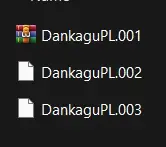
I am literally not allowed to upload .001, .002 and .003 files so folks please rename them manually, thank you
Follow along with the video below to see how to install our site as a web app on your home screen.
Note: This feature may not be available in some browsers.


ok after more trying it worked i didnt know u had to put them in a file togetheri renamed and everything yet its still corrupt for me

no dude i have it on i literally dont know how to extract the zipsthis thread just mega exposes people who dont have file extensions enabled and it shows so please guys, enable that thing, it's literally an anti virus by itself


Hi. I have tried your method. I changed "english" to "koreana"、"schinese" etc. but it's still English.I figured out how to change the language for this game.
Go to
"C:\Users\(user name)\AppData\Roaming\Goldberg SteamEmu Saves\settings"
Then, open language.txt and change 'english' to your language.
For example, if you want Korean, you must type 'koreana' (not 'korean')."
I hope this comment save someone from wasting their night like i did ㅠㅠ

sorry i undo this reply. I found that i can use the "steam_api.dll" and "steam_api64.dll" (which are in the "Goldberg Lan Steam Emu_master--475342f0") to overwrite this version's original .dll s, then i can use your methodHi. I have tried your method. I changed "english" to "koreana"、"schinese" etc. but it's still English.
I figured out how to change the language for this game.
Go to
"C:\Users\(user name)\AppData\Roaming\Goldberg SteamEmu Saves\settings"
Then, open language.txt and change 'english' to your language.
For example, if you want Korean, you must type 'koreana' (not 'korean')."
I hope this comment save someone from wasting their night like i did ㅠㅠ
icymi, this version also use Goldberg so you don't need to replace the dll, just create an ini for itsorry i undo this reply. I found that i can use the "steam_api.dll" and "steam_api64.dll" (which are in the "Goldberg Lan Steam Emu_master--475342f0") to overwrite this version's original .dll s, then i can use your method